
FRP Bypass Tool 2026 – Unlock All Android Devices Without Password
২১ এপ্রি, ২০২৬
Have you ever been locked out of your Android phone after a factory reset? That’s where the FRP Bypass Tool becomes a lifesaver. Factory Reset Protection (FRP) is designed to protect your device, but sometimes it can block even the rightful owner.
In this complete 2026 guide, we’ll show you how to use the latest FRP Bypass Tool to unlock all Android devices without a password. Whether you're a beginner or tech-savvy user, this guide from https://www.priyoblog.com/ will help you understand everything step by step.
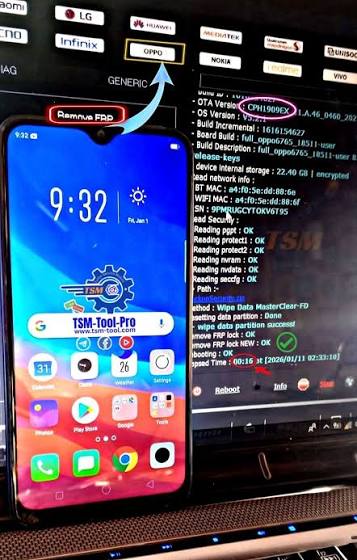 Here are the most effective and popular FRP Bypass Tool options in 2026:
What is FRP Lock?
Understanding Factory Reset Protection (FRP)
FRP (Factory Reset Protection) is a security feature introduced by Google for Android devices. It activates automatically when you sign in with a Google account.Why FRP Exists:
- Protects your device from theft
- Prevents unauthorized access
- Requires original Google account after reset
Problem:
If you forget your Google account credentials, your device becomes locked — and that’s where an FRP Bypass Tool helps.What is an FRP Bypass Tool?
An FRP Bypass Tool is a software or method that allows users to remove the Google account verification lock from Android devices after a factory reset.Key Features:
- Unlock without Google account
- Supports multiple Android versions
- Works on Samsung, Xiaomi, Oppo, Vivo & more
- Easy-to-use interface
How FRP Bypass Tool Works
[embed]https://youtu.be/7FUzcyKh3jk?si=1zXsO9gLePRORcjT[/embed]Basic Process:
- Connect your phone to a computer
- Run the FRP bypass software
- Follow on-screen instructions
- Remove Google account lock
Important Note:
Always use trusted tools to avoid malware or device damage.Best FRP Bypass Tools in 2026
Here are the most effective and popular FRP Bypass Tool options in 2026:
1. GSM Flasher Tool
- Supports most Android brands
- Free and widely used
- Simple interface
2. SamFw FRP Tool
- Best for Samsung devices
- One-click bypass feature
- Fast and reliable
3. FRP Hijacker Tool
- Specialized for older Samsung phones
- Lightweight and easy
4. D&G Password Unlocker
- Multi-brand support
- Advanced unlocking features
FRP Bypass Tool
Method 1: Using PC Software
Steps:
- Download a trusted FRP Bypass Tool
- Install it on your computer
- Connect your Android phone via USB
- Enable USB debugging (if possible)
- Run the tool and click “Bypass FRP”
- Wait until the process completes
Method 2: Without PC (APK Method)
Steps:
- Download FRP Bypass APK
- Transfer it to your phone
- Install via OTG or browser trick
- Open the app and remove the Google account
Supported Android Devices
The FRP Bypass Tool works on almost all major Android brands:Popular Brands:
- Samsung
- Xiaomi
- Oppo
- Vivo
- Huawei
- Realme
Advantages of Using FRP Bypass Tool
https://issuetracker.google.com/issues/265830871?pli=1Benefits:
- Saves time and money
- No need for technician
- Works at home بسهولة
- Supports latest Android versions
Risks and Precautions
While using an FRP Bypass Tool, keep these points in mind:⚠️ Risks:
- Data loss
- Security issues with fake tools
- Device compatibility problems
✅ Safety Tips:
- Download from trusted sources
- Backup data if possible
- Follow instructions carefully
On-Page Optimization:
- Use headings (H1, H2, H3)
- Add meta title & description
- Use short paragraphs
- Include bullet points
FAQ
1. Is FRP Bypass Tool legal?
Yes, it is legal if you are unlocking your own device. Avoid using it for unauthorized purposes.2. Can I unlock any Android phone?
Most devices are supported, but success depends on the Android version and brand.3. Do I need a computer?
Not always. Some methods work without a PC using APK files.4. Is FRP bypass permanent?
Yes, once removed, the lock will not return unless you reset the device again.5. Is it safe to use FRP Bypass Tool?
Yes, if you use trusted and verified tools.6. Does it delete data?
Usually yes, because FRP comes after factory reset.Final Thoughts
The FRP Bypass Tool in 2026 has become more advanced, faster, and easier to use than ever before. Whether you're locked out of your phone or helping someone else, these tools provide a reliable solution. However, always remember to use them responsibly and only on devices you own.Call to Action
Unlocking your Android phone no longer needs to be stressful. With the right FRP Bypass Tool, you can regain access in just a few simple steps. Want more helpful tech guides like this? Visit https://www.priyoblog.com/ for the latest tutorials, tools, and tips! Don’t forget to bookmark this guide and share it with others who might need help unlocking their Android devices
Priyo Blog
I try to share everything I know with you. Thank you for viewing the post.


